This is an old revision of the document!
— Hilmi 2022/08/01 17:28
Prototyping
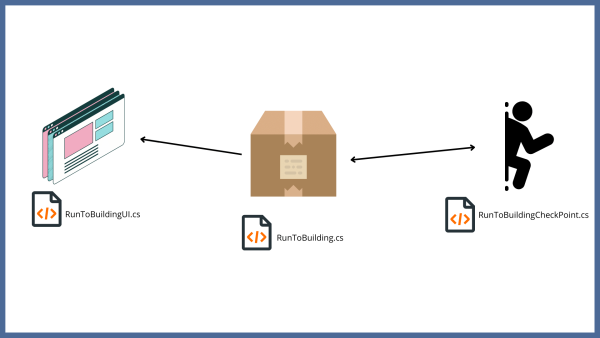
Game System
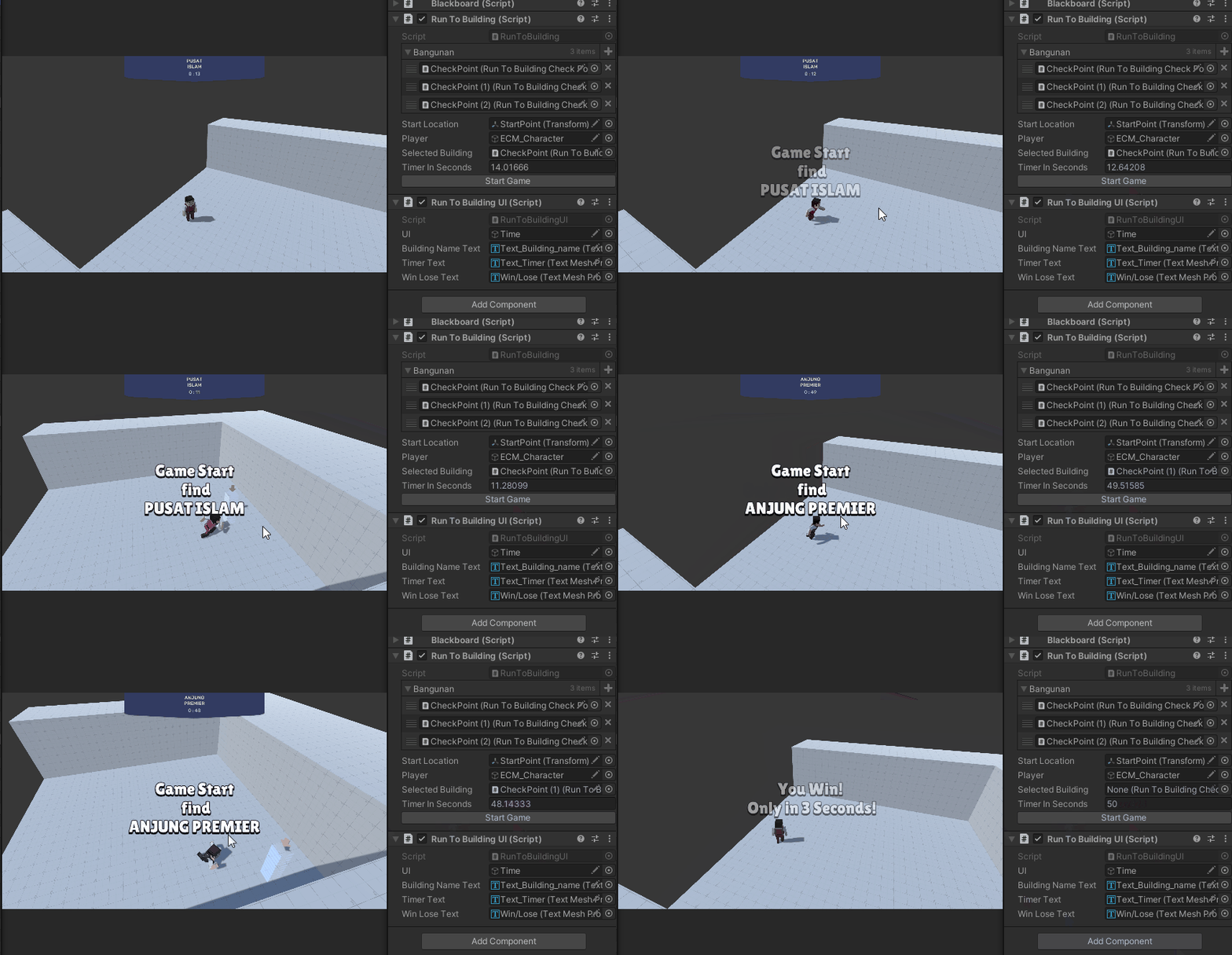
Finsihed Minigame
In this game mode I explore new things that is, Delegate and Actions, so now my gameManager script in this case RunToBuilding doesn't have any dependency to UI... UI script didn't
even existed in RunToBuilding, so less thing connected less thing will be broken.
RunToBuilding.cs
using Sirenix.OdinInspector;
using System;
using System.Collections;
using System.Collections.Generic;
using UnityEngine;

public class RunToBuilding : MonoBehaviour
{
    public event EventHandler SendEventUpdateTimer;
    public event EventHandler SendEventOnNewBuilding;
    public event EventHandler SendEventOnWin;
    public event EventHandler SendEventOnLose;

    public List<RunToBuildingCheckPoint> bangunan;
    public Transform startLocation;
    public GameObject player;

    [SerializeField]
    private RunToBuildingCheckPoint _selectedBuilding;

    public float timerInSeconds = 160;
    private float timerInSecondsInitial;

    private bool gameStarted = false;

    private void Start()
    {
        timerInSecondsInitial = timerInSeconds;
    }

    private void Update()
    {
        if (!gameStarted) return;

        StartTime();
    }

    [Button]
    public void StartGame()
    {
        SetPlayerLocationToStart();
        SetBuildingLocation();
        gameStarted = true;
    }

    public void StartTime()
    {
        if (timerInSeconds < 0f)
        {
            StopLoseGame();
            return;
        }

        //Decrement Timer
        timerInSeconds -= Time.deltaTime;

        SendEventUpdateTimer?.Invoke(this, EventArgs.Empty);
    }

    private void StopLoseGame()
    {
        EndGame();

        Debug.Log("You Lose");
        SendEventOnLose.Invoke(this, EventArgs.Empty);
    }

    private void StopWinGame()
    {
        SendEventOnWin?.Invoke(this, EventArgs.Empty);
        EndGame();
        Debug.Log("You Win");
    }

    private void EndGame()
    {
        SetPlayerLocationToStart();

        timerInSeconds = timerInSecondsInitial;

        gameStarted = false;

        _selectedBuilding.SetArrowOnOff(false);
        _selectedBuilding.gameObject.GetComponent<MeshRenderer>().enabled = false;
        _selectedBuilding = null;
    }

    private void SetBuildingLocation()
    {
        UnityEngine.Random.Range(0, bangunan.Count - 1);
        _selectedBuilding = bangunan[UnityEngine.Random.Range(0, bangunan.Count - 1)];
        _selectedBuilding.gameObject.GetComponent<MeshRenderer>().enabled = true;
        _selectedBuilding.SetArrowOnOff(true);
        _selectedBuilding.PlayerDetectedWin(() => StopWinGame());

        SendEventOnNewBuilding?.Invoke(this, EventArgs.Empty);
    }

    private void SetPlayerLocationToStart() => player.transform.position = new Vector3(startLocation.position.x, player.transform.position.y, startLocation.position.z);

    public float GetTimerInSeconds() => timerInSeconds;

    public string GetSelectedBuildingName() => _selectedBuilding.bangunan.namaBangunan;

    public float GetTimerInSecondsResult() => timerInSecondsInitial - timerInSeconds;
}
RunToBuildingUI.cs
using System.Collections;
using System.Collections.Generic;
using UnityEngine;
using TMPro;
using System;
using DG.Tweening;

public class RunToBuildingUI : MonoBehaviour
{
    public GameObject UI;
    public TextMeshProUGUI buildingNameText;
    public TextMeshProUGUI timerText;
    public TextMeshProUGUI winLoseText;

    private RunToBuilding _runToBuilding;

    private void Start()
    {
        CloseUI();
        _runToBuilding = GetComponent<RunToBuilding>();
        _runToBuilding.SendEventOnNewBuilding += ReceivedEventOnNewBuilding;
        _runToBuilding.SendEventUpdateTimer += ReceivedEventUpdateTimer;
        _runToBuilding.SendEventOnWin += ReceivedEventOnWin;
        _runToBuilding.SendEventOnLose += ReceivedEventOnLose;
    }

    #region ReceivedEvent
    private void ReceivedEventUpdateTimer(object sender, System.EventArgs e)
    {
        TimeSpan ts = TimeSpan.FromSeconds(_runToBuilding.GetTimerInSeconds());
        Debug.Log(ts.Minutes + " : " + ts.Seconds);

        timerText.text = ts.Minutes + " : " + ts.Seconds;
    }

    private void ReceivedEventOnNewBuilding(object sender, System.EventArgs e)
    {
        buildingNameText.text = _runToBuilding.GetSelectedBuildingName();
        OpenUI();
        StartCoroutine(RunWinLoseTextFaded("Game Start \n find \n" + buildingNameText.text));
    }

    private void ReceivedEventOnLose(object sender, EventArgs e)
    {
        StartCoroutine(RunWinLoseTextFaded("You Lose! \n Better Luck Nextime."));
        CloseUI();
    }

    private void ReceivedEventOnWin(object sender, EventArgs e)
    {
        StartCoroutine(RunWinLoseTextFaded("You Win! \n Only in " + Math.Round(_runToBuilding.GetTimerInSecondsResult()) + " Seconds!"));
        CloseUI();
    }
    #endregion

    private void CloseUI() => UI.SetActive(false);


    private void OpenUI() => UI.SetActive(true);


    private IEnumerator RunWinLoseTextFaded(string setText)
    {
        SetWinLoseText(setText);
        OpenWinLoseTextFaded();
        yield return new WaitForSeconds(3f);
        CloseWinLoseTextFaded();
    }

    private void SetWinLoseText(string setText) =>  winLoseText.text = setText;


    private void OpenWinLoseTextFaded() => winLoseText.DOFade(1, 3f);


    private void CloseWinLoseTextFaded() => winLoseText.DOFade(0, 3f);


}
RunToBuildingCheckPoint.cs
using System;
using System.Collections;
using System.Collections.Generic;
using UnityEngine;
using Micosmo.SensorToolkit;

public class RunToBuildingCheckPoint : MonoBehaviour
{
    [SerializeField]
    public Bangunan bangunan;

    public GameObject arrow;

    private RangeSensor sensor;

    private Action winCallBack;

    private void Start()
    {
        sensor = this.GetComponent<RangeSensor>();
    }

    public void PlayerDetectedWin(Action winCallBack)
    {
        this.winCallBack = winCallBack;
    }

    private void Update()
    {
        if(sensor.GetNearestDetection() != null)
        {
            if (winCallBack != null)
            {
                winCallBack();
                this.winCallBack -= this.winCallBack;
            }
        }
    }

    public void SetArrowOnOff(bool x)
    {
        arrow.SetActive(x);
    }


}


